Help desk
Help desk software for IT teams and internal support areas
Every request from your coworkers becomes a ticket with a priority, an owner, response times and a full history, instead of getting lost between chat, hallway asks and forwarded emails.
A 30-minute demo and 15 days free to try it with your team.

The problem
Requests come from everywhere and nobody knows which one is next
IT, facilities, finance and HR teams serve other departments as if they were customers. Without a help desk, work arrives through whatever channel is closest and reshuffles itself.
- Requests come in through chat, in the hallway or in a forwarded email, and no one has the full list.
- There is no priority or due date: the team handles whoever pushes hardest, not what matters most.
- The urgent ticket reshuffles the whole day, and planned work is left half done without anyone noticing.
- There is no history, so when someone asks "what happened with my request?", it has to be pieced together from memory.
- When a problem needs real work, like a migration or a change, the request and the task live in different tools.
How it works
From request to closed ticket, in one place
- 01
The ticket is created
Your team logs it in Flouster with a category (bug, improvement or change request, question or other) and a priority (critical, high, medium or low). It can also arrive over WhatsApp: the AI classifies it and your team reviews it.
- 02
It gets an owner and the clock starts
Every ticket has an assignee plus response and resolution times. The list flags what is overdue, what is due soon and what is on track.
- 03
It is worked with context
The ticket moves from open to in progress, and the people following it comment and attach evidence in the same thread. If it calls for planned work, it is linked to a project task.
- 04
It is resolved and measured
When it closes, the requester answers a satisfaction survey (CSAT). From the month's tickets, Flouster builds a branded PDF report you can share with whoever asks for it.
What a help desk needs, already built in
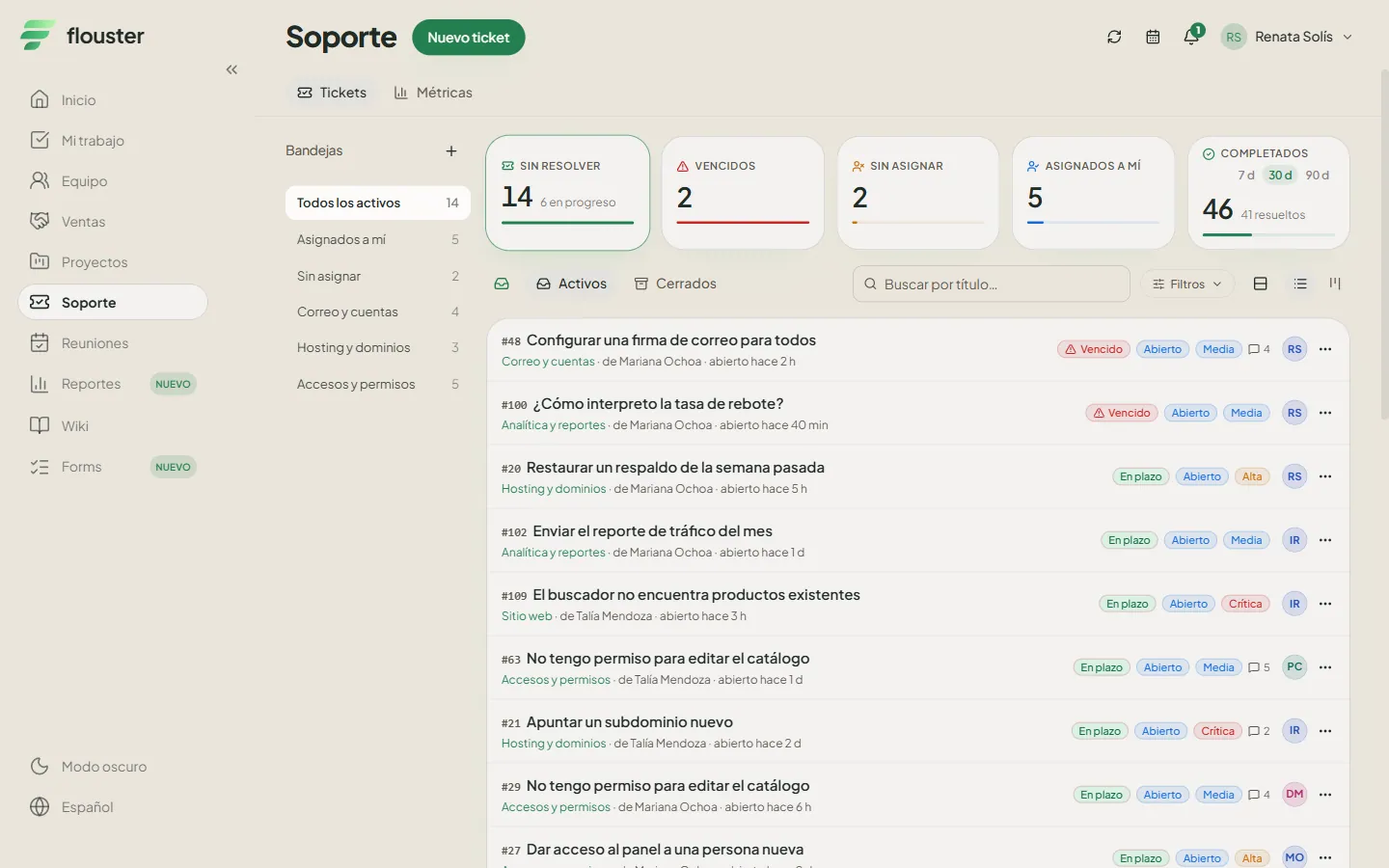
-
Tickets with priority, status and SLAs
Categories, four priority levels, statuses from open to closed, comments, attachments, and response and resolution times with overdue warnings.
-
WhatsApp intake with AI
Your coworkers write the way they always do. The AI suggests a category, priority and module, splits several requests into separate tickets and asks up to two missing details. When it is not sure, it flags the ticket as a suggestion so your team can correct it.
-
Inboxes for each team
Create shared, team or personal inboxes to see only what is yours, and check help desk metrics by status, by priority and by each person's workload.
-
From ticket to project task
When a ticket needs several days of work, link it to a task in a project with sprints, milestones and board, list and calendar views, with nothing to retype.
-
Team and capacity
See how much work each person already has before assigning another ticket, and add followers so the right people get updates, in the app and as push notifications.
-
Monthly reports and a wiki
The month's support summary comes out as a branded PDF, and recurring fixes are documented in a wiki so nobody answers the same question twice.

Who it is for
For teams that serve other departments
Built for IT, systems, facilities, procurement, finance, HR or any team that receives requests from coworkers and needs to organize, prioritize and show what it handled. It also helps the person leading the team, who needs to see the team's workload and the state of the queue without asking one person at a time.
Frequently asked questions
What is help desk software and what is it for?
Help desk software collects the requests a team receives in one place, as tickets. Each ticket has a category, priority, owner, status and history, so you can order the queue, know what comes first and look back at what happened. Flouster offers it for IT teams and for any department that serves other departments as internal customers.
Can I use Flouster as a help desk for an internal team that is not IT?
Yes. Categories, priorities, statuses and inboxes work the same for facilities, procurement, finance, HR or any team that receives requests from coworkers. Each team can have its own inbox and see only the tickets that are theirs.
How does Flouster keep track of response times?
Each ticket carries a response time and a resolution time, and the list shows whether it is overdue, due soon or on track. The help desk metrics also show tickets by status and by priority, and how many each person has assigned.
Can tickets be created through WhatsApp?
Yes. The requester writes over WhatsApp and the AI suggests the category, priority and module, splits several requests into separate tickets and asks up to two missing details. If it is not sure about the classification, it marks it as a suggestion. Your team can review and correct the ticket before working on it. It also answers queries like "my tickets".
Is the help desk data protected?
The information in your workspace is stored on servers in Mexico, and each organization is isolated from the others. Inside your organization, each person sees what their role allows. The AI classification of tickets is processed outside Mexico, and the privacy notice explains how.
Put your team's queue in order
Book a demo and we will review how requests reach your team today, then set up the help desk with your categories, priorities and inboxes.