Agencies, consultancies and software houses
Project and support management software for agencies and consultancies
Sprints, deliverables and your clients’ support requests in one system. Each ticket is linked to the task that resolves it, so your team sees what is holding up a delivery and how much of the work comes from incidents.
A 30-minute demo and 15 days free to try it with your team.

The problem
Projects in one tool, support in another
In an agency or consultancy, contracted work and the requests that arrive unannounced compete for the same people but get tracked in different places. The result is that nobody has the full picture.
- An urgent ticket takes hours from a deliverable and the project board never shows it.
- Nobody can say how much of a project’s work is support that was never in scope.
- You assign work without seeing how much each person is already carrying, and someone ends up overloaded.
- Meeting decisions stay buried in minutes and nobody follows up on them.
- The monthly client report is put together by hand, copying numbers from two or three tools.
How it works
How Flouster solves it
- 01
Organize the contracted work
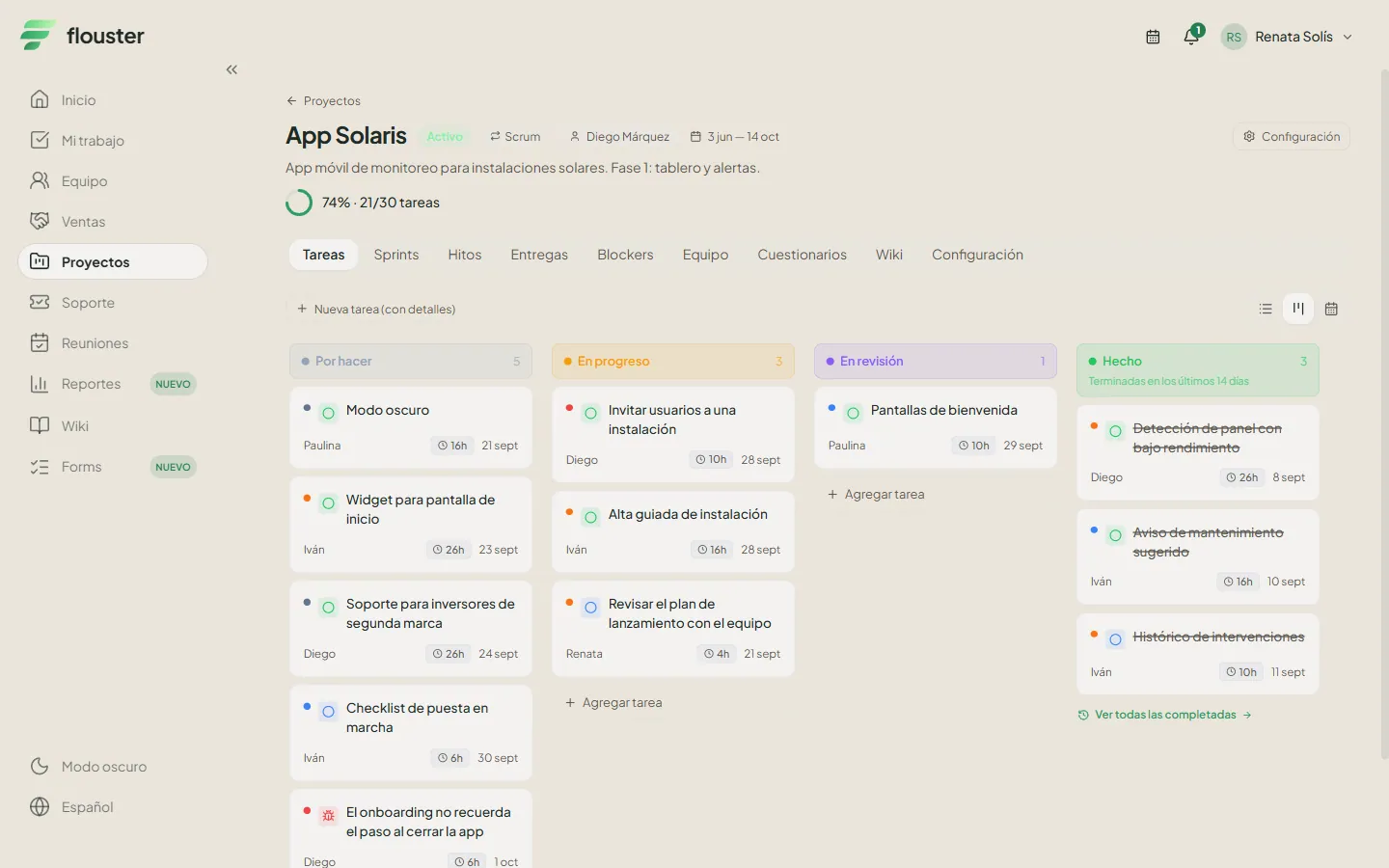
Create a project per client or per contract and choose its type: Scrum, Kanban, Basic or Bug. Break it into initiatives, milestones, tasks and subtasks, and define the deliverables you are committing to.
- 02
Receive support in the same system
Tickets arrive in the support inbox, including through WhatsApp, where AI creates the ticket. When a ticket needs work, you link it to a task in the right project.
- 03
Assign with workload in view
Before assigning, check how many tasks each person has against their capacity. Support work and project work show up in the same load, not in two separate lists.
- 04
Close the month with a report
At month end you have the projects, support and teams summaries in one place, ready to export to PDF and share with your client or leadership.
What an agency gets out of the box
-
Projects shaped to each client
Configurable project types (Scrum, Kanban, Basic and Bug), sprints, initiatives, milestones, tasks and subtasks. Work in kanban, list or calendar, and see everything together on the roadmap.
-
Support linked to the task that resolves it
From a ticket you see the tasks needed to close it, and from a task you reach its ticket. Support metrics sit next to project metrics, with the full history of every case.
-
Visible deliverables and blockers
Track each project’s deliverables and log blockers with their details, so when a delivery slips it is clear what held it up.
-
Team and capacity
Check each person’s workload before assigning them anything. Organize your people into teams and stop handing out work blindly.
-
Monthly reports in PDF
The month’s summary by area: projects, support and teams, with the option to export it to PDF. No more re-entering numbers in a spreadsheet.
-
Meetings that leave real tasks
Write the minutes during the meeting and turn each agreement into a task with an owner. With objectives and key results you connect that work to what the agency is trying to achieve.

Who it is for
For teams that sell projects and also provide support
Built for software, marketing and design agencies, consultancies, software houses and managed service providers (MSPs) that split the same people between deliveries and customer support. If you use one board for projects, another tool for tickets and a spreadsheet for reporting, this puts them in a single workspace. It also includes a CRM with companies, contacts and opportunities, a wiki and documents, and chat, plus a portal where your clients can follow their projects and tickets.
Frequently asked questions
Can Flouster work as project management software for consultancies and agencies?
Yes. Flouster lets you run projects with sprints, initiatives, milestones, tasks, subtasks, deliverables and blockers, with kanban, list and calendar views and a roadmap. It also includes support, team and capacity, meetings, objectives, a CRM and a wiki, so an agency or consultancy can operate from a single workspace.
Can I manage my clients’ projects and support in the same system?
Yes. Support tickets are linked to the tasks that resolve them: from a ticket you see the tasks still needed to close it, and from a task you can open its ticket. Support metrics are shown next to project metrics, and the monthly report includes a projects summary, a support summary and a teams summary. Completing every task does not close the ticket automatically: that decision stays with whoever answers the client.
Which project types and methodologies does it support?
Each project can be Scrum, Kanban, Basic or Bug, and its configuration is editable. With Scrum you work with sprints and a backlog; with Kanban, a continuous flow. You can view tasks as a board, a list or a calendar, and organize them into initiatives, milestones, tasks and subtasks.
Can my clients log in to see their project progress?
Yes. With the client portal, your client logs in to see their project progress, deliverables and tickets, and raises requests without asking you. You can also share the monthly report as a PDF, and they can report issues through WhatsApp so a ticket gets created.
Where is my agency’s data stored?
Your workspace data is stored on servers in Mexico and isolated by organization, so each workspace only sees its own information. For more detail, book a demo and we will go through it with your case.
See your projects and your support on one screen
Book a demo and we will show you Flouster with your agency’s actual workflow: how a ticket comes in, how it links to a task and what the month’s report looks like.